
Casestudy
Begrijp hoe uw team AI gebruikt, en zet vervolgens veiligheidsmechanismen op om te voorkomen dat uw mensen gevoelige gegevens delen met AI-tools. Met LastPass Business Max krijgt u inzicht en controle.
Geen creditcard vereist voor proefperiode. Na de proefperiode kost Business Max $11 per gebruiker per maand.
van de ondervraagde beheerders zegt dat AI al overal in hun organisatie wordt gebruikt.
van de organisaties zegt dat het invoeren van gevoelige gegevens in AI door medewerkers hun grootste zorg is.
Slechts 22% heeft tools om AI-gebruik te monitoren en te loggen.
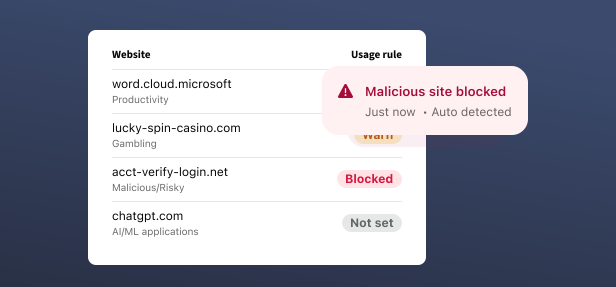
Zie welke websites uw medewerkers bezoeken, stel regels in om riskant surfgedrag te verminderen en blokkeer schadelijke websites.
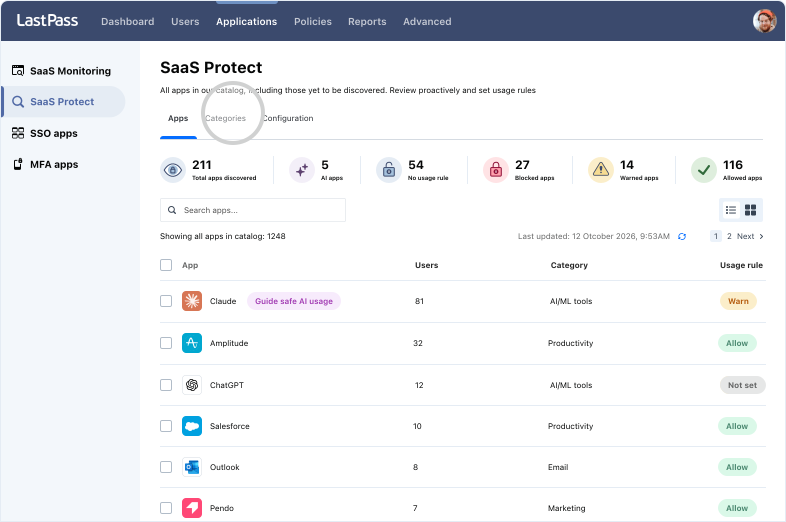
Ontdek schaduw-SaaS, stel regels in voor gebruik van toepassingen en bescherm zakelijke aanmeldingsgegevens voor alle SaaS-toepassingen die uw team gebruikt.


klanten beveiligen hun wachtwoorden met LastPass

Beoordeling in Chrome en App Store
Gebaseerd op ruim 79.300 recensies

Leider op het gebied van wachtwoordbeheer
Gebaseerd op ruim 1600 recensiesbedrijven kiezen voor LastPass


Ik verstuur waarschuwingen, maar ik blokkeer niet. Zo leren mensen om de risico's te begrijpen, zonder dat ze zich beperkt voelen. Dat bouwt vertrouwen.






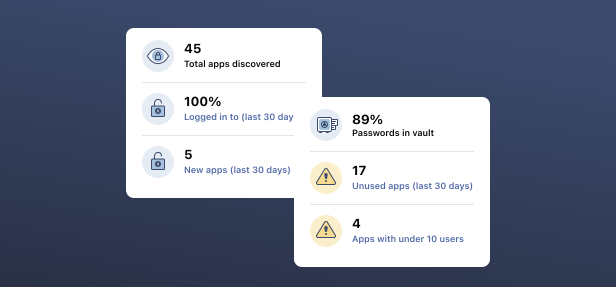
Wat de gegevens van LastPass vertellen over de risico’s van AI-tools, apps en aanmeldgegevens die aan de aandacht van de IT-afdeling ontsnappen.
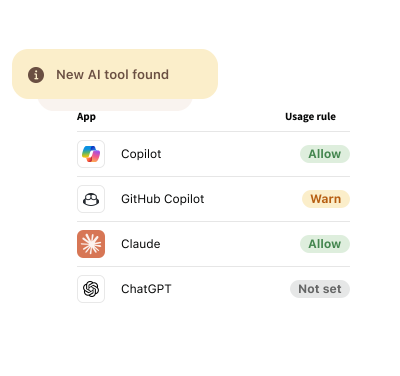
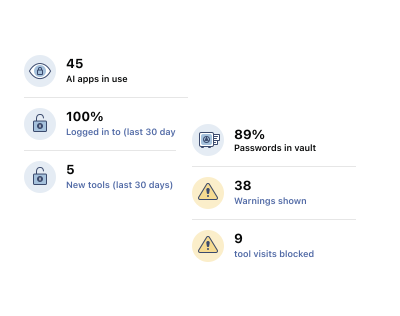
LastPass AI Monitoring maakt dit duidelijk zichtbaar. De software voor AI-monitoring detecteert via de LastPass-browserextensie welke tools uw medewerkers gebruiken, ook als die niet zijn goedgekeurd door de IT-afdeling. U ziet ook of mensen zich aanmelden met SSO, een wachtwoord, of aanmeldingsgegevens die niet in een kluis staan. De gedetecteerde toepassingen, inlogmethoden, kluisstatus van aanmeldingsgegevens en activiteiten per gebruiker verschijnen allemaal in het dashboard van uw Admin Console. De tool werkt in de browser, dus u hoeft geen nieuwe software te installeren. AI Monitoring & Protect is inbegrepen in LastPass Business Max.
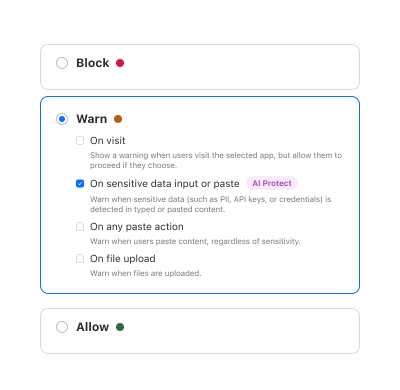
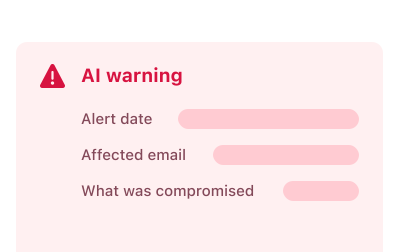
Met AI Protect van LastPass kunt u medewerkers precies op het juiste moment waarschuwen. Als een medewerkers op het punt staat om aanmeldingsgegevens, API-sleutels of persoonlijke gegevens te delen met een AI-tool, verschijnt een duidelijke waarschuwing in de browser. Iedere waarschuwing wordt gelogd in de Admin Console, zodat u een compleet overzicht krijgt van de organisatiebrede gegevensrisico's door AI. De functie leest niet mee met de volledige inhoud van gesprekken met AI en logt deze ook niet. Alleen de waarschuwing zelf wordt gelogd, niet de gegevens die de waarschuwing hebben geactiveerd. Als u platformen voor AI-beveiliging vergelijkt, biedt LastPass u een gebruiksvriendelijke oplossing via de bestaande extensie, zonder nieuwe leverancier.
Dat kan gebeuren. Daarom werkt LastPass niet met een “alles of niets” benadering, maar biedt het uw beheerders controle over de manier waarop AI-tools gebruikt worden. Met AI Protect kunt u gebruiksregels instellen voor iedere tool. U kunt goedgekeurde tools direct toestaan en tools blokkeren die niet aansluiten bij uw AI-strategie, maar ook waarschuwen bij tools die nog in overweging zijn. Medewerkers zien ook een handige waarschuwing als ze op het punt staan om gevoelige gegevens te delen met AI, zodat ze met vertrouwen kunnen doorwerken. Met LastPass AI Monitoring kunt u aanmerken of tools wel of niet goedgekeurd zijn, zodat u de gebruiksregels kunt aanpassen aan de praktijk. Zo ondersteunt uw AI-beveiliging de aanname van goede tools, zonder concessies aan de productiviteit.
Zorg eerst dat u weet wat uw mensen gebruiken, en stuur vervolgens hun gedrag aan. Met LastPass AI Monitoring ziet u welke tools uw mensen gebruiken en hoe ze zich hierbij aanmelden, ook bij ongeoorloofd gebruik. Zo krijgt u een helder inzicht in de praktijk op de werkvloer. AI Protect geeft u daarna de mogelijkheid om in te grijpen, bijvoorbeeld door mensen te waarschuwen als ze op het punt staan om gevoelige gegevens te delen, of door AI-tools de blokkeren die niet aansluiten bij uw strategie. Samen vormen deze functies een platform voor AI-beveiliging, zonder extra overhead: gegevensbeveiliging voor AI die uw werk niet vertraagt. Monitoring & Protect werken allebei via de browserextensie die uw team al gebruikt. U hoeft geen extra software te installeren en er is geen aanvullende training nodig voor uw medewerkers.
Het grootste risico is dat u niet weet wat er gebeurt. In veel organisaties kan de IT-afdeling niet zien welke tools mensen gebruiken en hoe ze zich hier aanmelden – via SSO, met een wachtwoord, of vaak ook met een privéaccount zonder beheerde beveiliging. Het is dan ook niet duidelijk welke gegevens worden blootgesteld. Een tweede probleem is dat medewerkers per ongeluk aanmeldingsgegevens, API-sleutels en gevoelige gegevens delen met AI-tools. Dit gebeurt niet opzettelijk. AI Monitoring van LastPass laat zien hoe uw medewerkers AI gebruiken in de praktijk, en met AI Protect kunt u hen waarschuwen als ze op het punt staan bepaalde gegevens te delen. Ook kunt u ongeoorloofde tools blokkeren of ervoor waarschuwen. Een platform voor AI-beveiliging in uw bestaande Admin Console helpt om deze zwakke plekken af te dichten.
